Products in EasyWeb
How do they work and how to add them?
💡 Products are the central element all of EasyWeb's logic is built around. They decide what's shown on the landing page, which orders are recorded in the CRM and how integrations work.
How are products linked to landing pages?
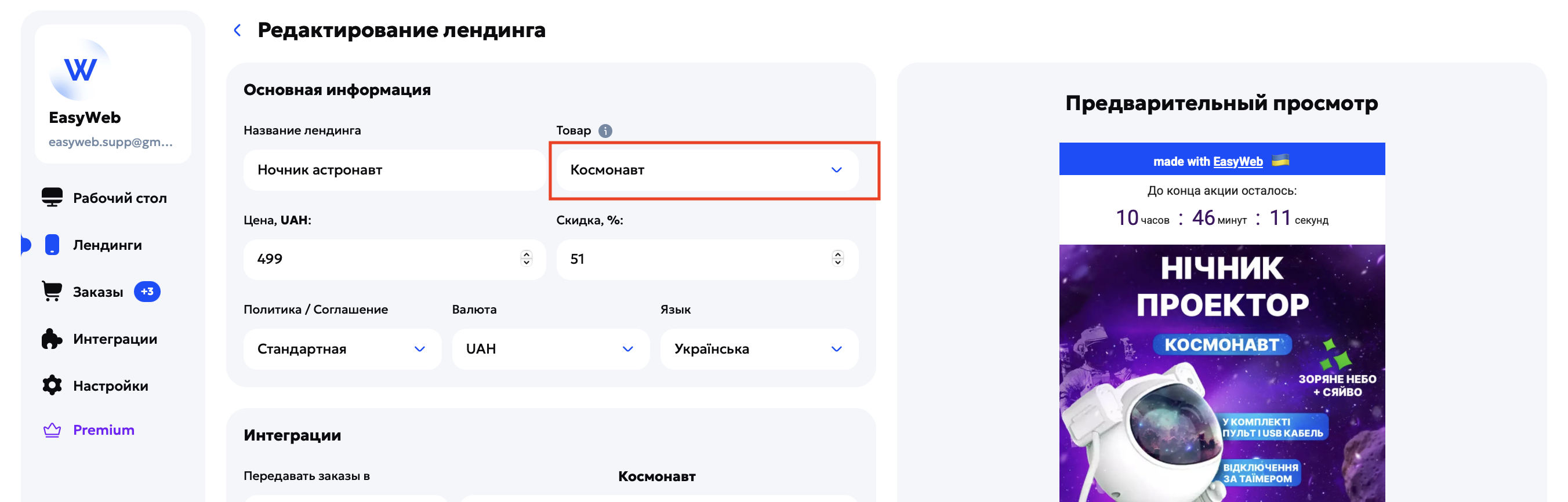
Main product
Chosen in the landing page settings. It serves as the landing page's identifier for the system.
Multi-product block
Lets you add other (additional) products to the same site. Each of them is added inside the landing page builder with the “Products Premium” block. Read more in “How to create a multi-product landing page”.
Integrations
Telegram, CRM and EasyWeb Orders are linked to the product, not to the landing page. This means the product decides which data is sent when an order is placed.
Where are products and how to add them?
Go to “Landing pages → Products → Add new / Edit”.
Required fields
- Name — shown in the list for choosing the main product, and on the landing page itself when the product is used in the multi-product block.
- Price — if the product is chosen as the main one, you can set the price by hand right in the landing page settings (by default the price from the product card is shown). If the product is used in the multi-product block, the price is pulled from the product card automatically and can't be changed in the builder.
Optional fields
- Images — up to 10. If you add several, the multi-product block card shows a slider.
- Description — a short text shown under the price (only in the multi-product block).
- Specifications — a table that shows the product's key properties.
- Category — used for internal order and, in the future, for sorting by category.
- Variations — sizes, colors, volumes, bundles, etc. Added to show in the order form. Read more in “How to add product variations”.
⚠️ Important: images are fitted to a square automatically (the proportions can't be changed). So we recommend using the same proportions for a better look.
What should you know about editing products?
Any changes in a product card update automatically in all landing pages where the product is used — but only in EasyWeb (except when the price of the main product was set by hand).
⚠️ If you downloaded the landing page before the changes, download the archive again to see the updates.
There's no bulk import/editing of products yet — but we're working on it.
Frequently asked questions
Can I create several products for one landing page?
Yes. One is the main product (via the settings), the rest are added in the multi-product block.
How do I change the order of images?
After uploading the pictures, just drag them into the order you need in the product settings.
If I change prices or photos, will the site update automatically?
Yes, but only in EasyWeb. If you've already uploaded the site to hosting, you need to upload the new version of the archive again.
Can I duplicate a product as a template?
Not yet, but we've already planned this feature.